Test Markdown

my blog

This is just a sample. You can play around with your own text right here.

Markdown

…is really just ordinary text, plain and simple. How is it good for you?

  • You just type naturally, and the result looks good.
  • You don’t have to worry about clicking formatting buttons.
    • Or fiddling with indentation. (Two spaces is all you need.)

To see what else you can do with Markdown (including tables, images, numbered lists, and more) take a look at the Cheatsheet. And then try it out by typing in this box!


mphasis, aka italics, with asterisks or underscores.

Strong emphasis, aka bold, with asterisks or underscores.

Combined emphasis with asterisks and underscores. nghiêng và đậm
Strikethrough uses two tildes. Scratch this. Cái này không đúng nè


  1. First ordered list item
  2. Another item
    • Unordered sub-list.
  3. Actual numbers don’t matter, just that it’s a number
    1. Ordered sub-list
  4. And another item.

    You can have properly indented paragraphs within list items. Notice the blank line above, and the leading spaces (at least one, but we’ll use three here to also align the raw Markdown).

    To have a line break without a paragraph, you will need to use two trailing spaces.
    Note that this line is separate, but within the same paragraph.
    (This is contrary to the typical GFM line break behaviour, where trailing spaces are not required.)

  • Unordered list can use asterisks
    • Or minuses
      • Or pluses

I’m an inline-style link

I’m an inline-style link with title

I’m a reference-style link

I’m a relative reference to a repository file

You can use numbers for reference-style link definitions

Or leave it empty and use the link text itself

Some text to show that the reference links can follow later.


Here’s our logo (hover to see the title text):

Inline-style:
alt text

Reference-style:
alt text


Tables

Colons can be used to align columns.

Tables Are Cool
col 3 is right-aligned $1600
col 2 is centered $12
zebra stripes are neat $1

The outer pipes (|) are optional, and you don’t need to make the raw Markdown line up prettily. You can also use inline Markdown.

Markdown Less Pretty
Still renders nicely
1 2 3

Quotes

Blockquotes are very handy in email to emulate reply text.
This line is part of the same quote.

Quote break.

This is a very long line that will still be quoted properly when it wraps. Oh boy let’s keep writing to make sure this is long enough to actually wrap for everyone. Oh, you can put Markdown into a blockquote.

Thế cái này gọi là quote của Vũ Nhân! Hết chuyện!!!


Inline HTML

Definition list
Is something people use sometimes.
Markdown in HTML
Does *not* work **very** well. Use HTML tags.

There is more horizontal rule

Three or more…


Hyphens


Asterisks


Line breaks

Here’s a line for us to start with.

This line is separated from the one above by two newlines, so it will be a separate paragraph.

This line is also a separate paragraph, but…
This line is only separated by a single newline, so it’s a separate line in the same paragraph.


Youtube videos

IMAGE ALT TEXT HERE

Or in pure Markdown, but losing size and border

IMAGE ALT TEXT HERE

Thay đổi

Áo mới cho cục cưng


Làm cái hình để đó chơi đã, hê hê Config GTK+ -> lxappearance (Community), cài vào rồi quất thôi, hế hế.

/proc filesystem

Viết cái tiêu đề để dành, khi nào quởn viết về chủ đề này! :)


proc Filesystem
Certain filesystems like the one mounted at /proc are called pseudo filesystems because they have no permanent presence anywhere on disk.
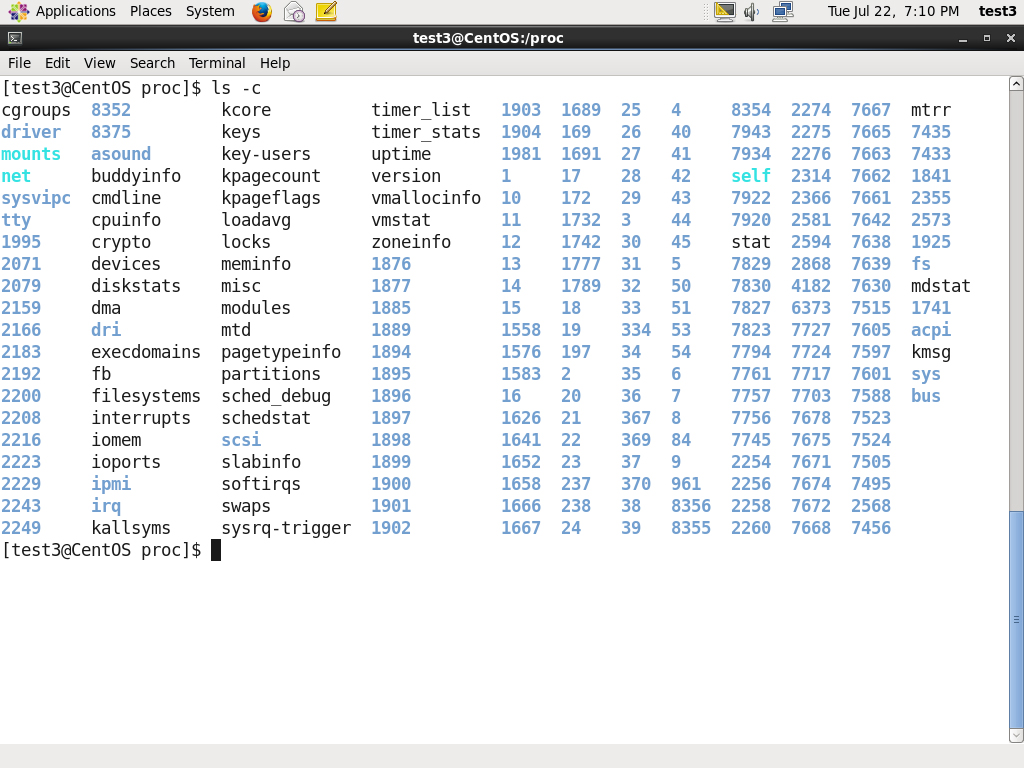
The /proc filesystem contains virtual files (files that exist only in memory) that permit viewing constantly varying kernel data. This filesystem contains files and directories that mimic kernel structures and configuration information. It doesn't contain real files but runtime system information (e.g. system memory, devices mounted, hardware configuration, etc). Some important files in /proc are:
/proc/cpuinfo
/proc/interrupts
/proc/meminfo
/proc/mounts
/proc/partitions
/proc/version
/proc has subdirectories as well, including:
/proc/
/proc/sys
The first example shows there is a directory for every process running on the system which contains vital information about it. The second example shows a virtual directory that contains a lot of information about the entire system, in particular its hardware and configuration. The /proc filesystem is very useful because the information it reports is gathered only as needed and never needs storage on disk.

Linux và lỗi

Nếu bạn là người dùng win và vừa cài linux (máy ảo hoặc cài chơi cho vui) thì bài này có lẽ sẽ không phù hợp với nhu cầu của bạn.
Khi sử dụng linux, những điều không như mong muốn, những hiện tượng lạ hoặc nôm na là "lỗi" sẽ là một phần cuộc sống của bạn, thiếu nó linux của bạn sẽ như một xác chết không hơn không kém (ý kiến cá nhân thôi =]] )
Vì vậy mình lược dịch và viết lại blog này nhằm hệ thống lại một số phương pháp xử lý khi gặp lỗi trong lúc sử dụng linux. =)) Đây là một vài link mình tham khảo trong quá trình viết blog này.
https://wiki.archlinux.org/index.php/General_troubleshooting
http://www.maximumpc.com/article/features/linux_troubleshooting_guide_fix_most_common_problems
Okay, đi lòng vòng thế đủ rồi, chúng ta bắt đầu!

Hãy chú ý vào các chi tiết.

Theo trình tự giải quyết vấn đề mà bạn gặp phải, hoàn toàn chắc chắn rằng bạn phải hiểu rõ ràng chức năng của hệ thống mà bạn đang xử lý. Cách nó vận hành, và nó cần những gì để chạy mà không gặp lỗi? Nếu như bạn không thể trả lời các câu hỏi ở trên thì tôi thật sự khuyên bạn nên xem lại Archwiki với chủ đề phù hợp với vấn đề mà bạn đang gặp phải (nôm na là đọc lại tài liệu để biết chính xác mình cần gì và hệ thống cần - có gì?) Một khi bạn đã hiểu rõ hệ thống của mình, nó sẽ dễ dàng hơn để xác định chính xác vấn đề của mình (pin-point your problem)

Câu hỏi/ danh sách kiểm tra (Questions/ Checklist)  

Sau đây tôi sẽ đưa cho bạn một số câu hỏi để bạn có thể giải quyết hệ thống của bạn khi nó gặp trục trặc. Dưới mỗi câu hỏi sẽ có ghi chú về cách mà bạn nên trả lời cho mỗi câu hỏi để đạt được hiệu quả cao nhất. theo dõi các ví dụ ngắn để tìm ra cách tổng hợp các output cần thiết để chẩn đoán lỗi cũng như những công cụ giúp bạn xem file log cũng như journal (mình vẫn còn ngu ngơ về journalctl) :brick:
  1.  Lỗi là gì?
    • "Càng chi tiết càng tốt!". Nó sẽ khiến bạn không cảm thấy bối rối hoặc lạc hướng khi tìm kiếm thông tin cụ thể.
  2. Những thông báo lỗi là gì? (nếu có)
    • Hãy copy toàn bộ output chứa thông báo lỗi (nếu bạn không thấy nó, hãy khởi động chương trình từ terminal thay vì GUI) và đưa nó vào 1 file .log. Có thể >> $HOME/issue.log (Hãy dùng toán tử >> để đảm bảo không ghi đè các dữ liệu cũ - xem lại chuyển hướng nhập xuất với shell nhé).
  3. Bạn có thể tái hiện lại lỗi đó không?
    • Nếu có thể, hãy ghi lại chính xác từng bước/ từng lệnh mà bạn đã làm để gây ra lỗi đó.
  4. Lần đầu bạn gặp lỗi đó là khi nào và điều gì đã bị thay đổi trong hệ thống của bạn trước và sau khi xảy ra lỗi?
    • Nếu lỗi xảy ra ngay sau khi bạn update hệ thống, hãy liệt kê tất cả những gói được update (kèm phiên bản). Nếu Arch, bạn có thể tìm thấy tại /var/log/pacman.log. Và hãy check status của bất kỳ dịch vụ nào liên quan đến ứng dụng (systemd - dùng systemctl)

Hãy cụ thể hơn nữa!

Khi cố gắng giải quyết một vấn đề, đừng bao giờ tiếp cận nó theo cách:
Ứng dụng X không hoạt động!
Thay vào đó, hãy nhìn một cách tổng quát hơn:
Ứng dụng X báo lỗi Y, khi thực thi tác vụ Z trong điều kiện A và điều kiện B.